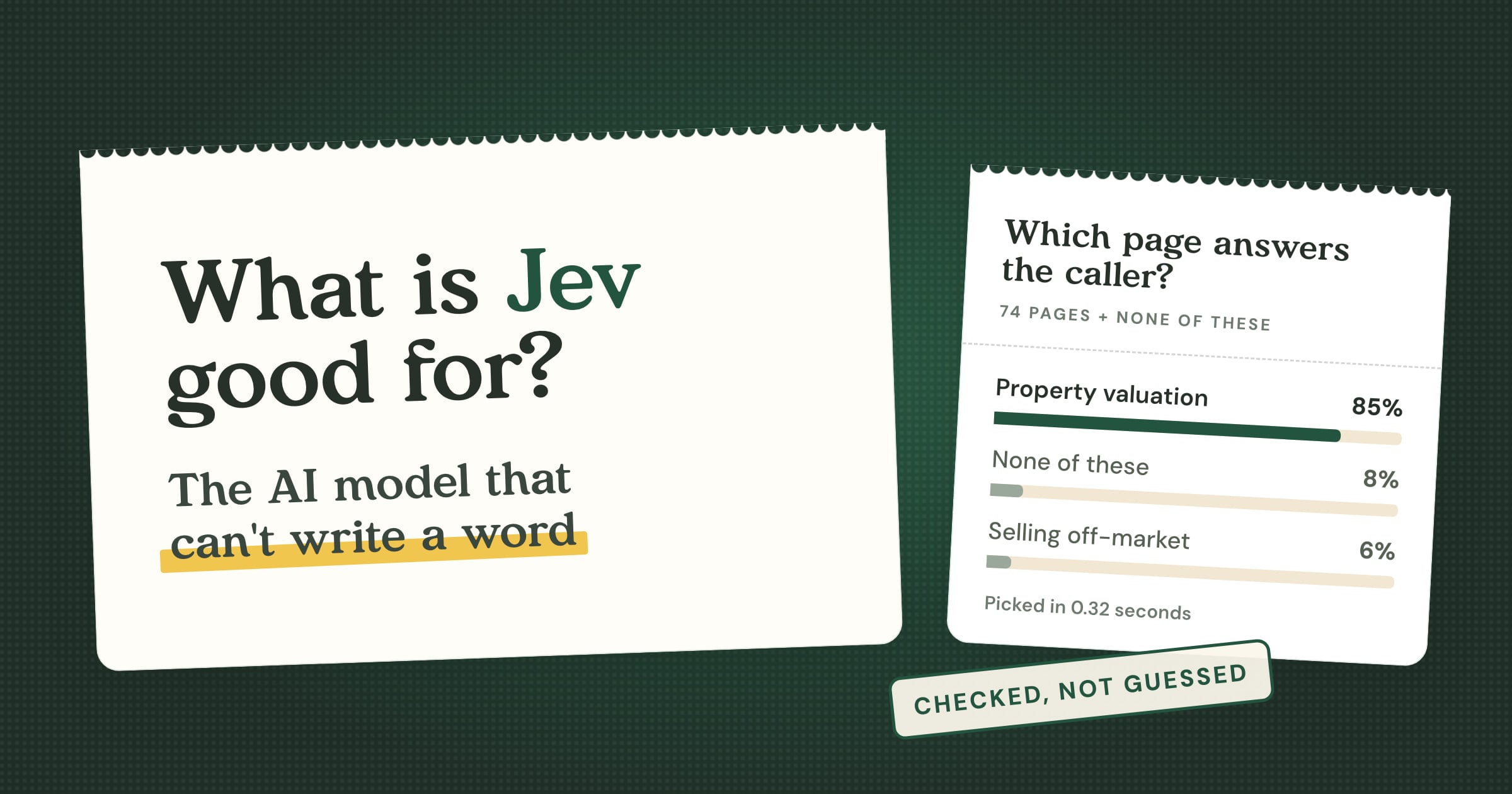
Jev is an AI model that picks instead of writing. You give it a situation and a list of options, and in about a third of a second it tells you which option fits, how sure it is about every one of them, and whether none of them do. That's the whole trick. It turns out to be good for a surprising amount.
If you've ever asked ChatGPT something about your own business and watched it confidently make up the answer, you'll know the problem Jev solves. Large language models are brilliant talkers. They're much less brilliant at knowing when to stop talking. If you're thinking about putting AI in front of your customers, that's the bit that keeps you up at night.
Jev comes at AI from the other end. It can't write a sentence, which sounds like a weakness until you see what you get in return. It can only ever answer from the options you give it. Every answer comes with a probability. And if you add "none of these" to the list, it'll actually use it.
We've spent the last few weeks putting Jev to work inside Sayora, the AI receptionist we build for small businesses. I went in expecting a novelty. I came out with a test where it beat the standard approach by a margin that genuinely surprised me (more on that below).
In this article, I'll share:
- What Jev is, and whether it counts as an LLM (it doesn't)
- Why a model that can't write is useful to a small business
- Three things people have already built with it, from safety checks to playing Doom
- What happened when we let it look things up for our AI receptionist
- How to start using decision models yourself, and where they fall short
I'm not going to tell you Jev will transform your business. I can hear your eyes rolling from here. It's a three-week-old model from a startup, and it does exactly one job. But it's the clearest example I've seen of where AI is heading: away from one giant model trying to do everything, towards teams of specialist models that each do one thing really well. If you run a small business, that's good news, and I'll explain why.
What is Jev?
Jev is a decision model made by TypeSafe, an AI startup founded by Diogo Almeida. Before TypeSafe, Diogo was at OpenAI, where he helped build the methods that taught language models to follow instructions and hold a conversation. That research ended up behind ChatGPT. Jev launched on 15 September 2026.
Diogo describes Jev as a function call with frontier intelligence inside it: "unstructured state in, typed probabilistic decisions out."
In plain English: you hand Jev something messy (an email, a phone call, a customer's question) along with a tightly defined question about it. It hands back a decision, plus how confident it is in every possible answer.
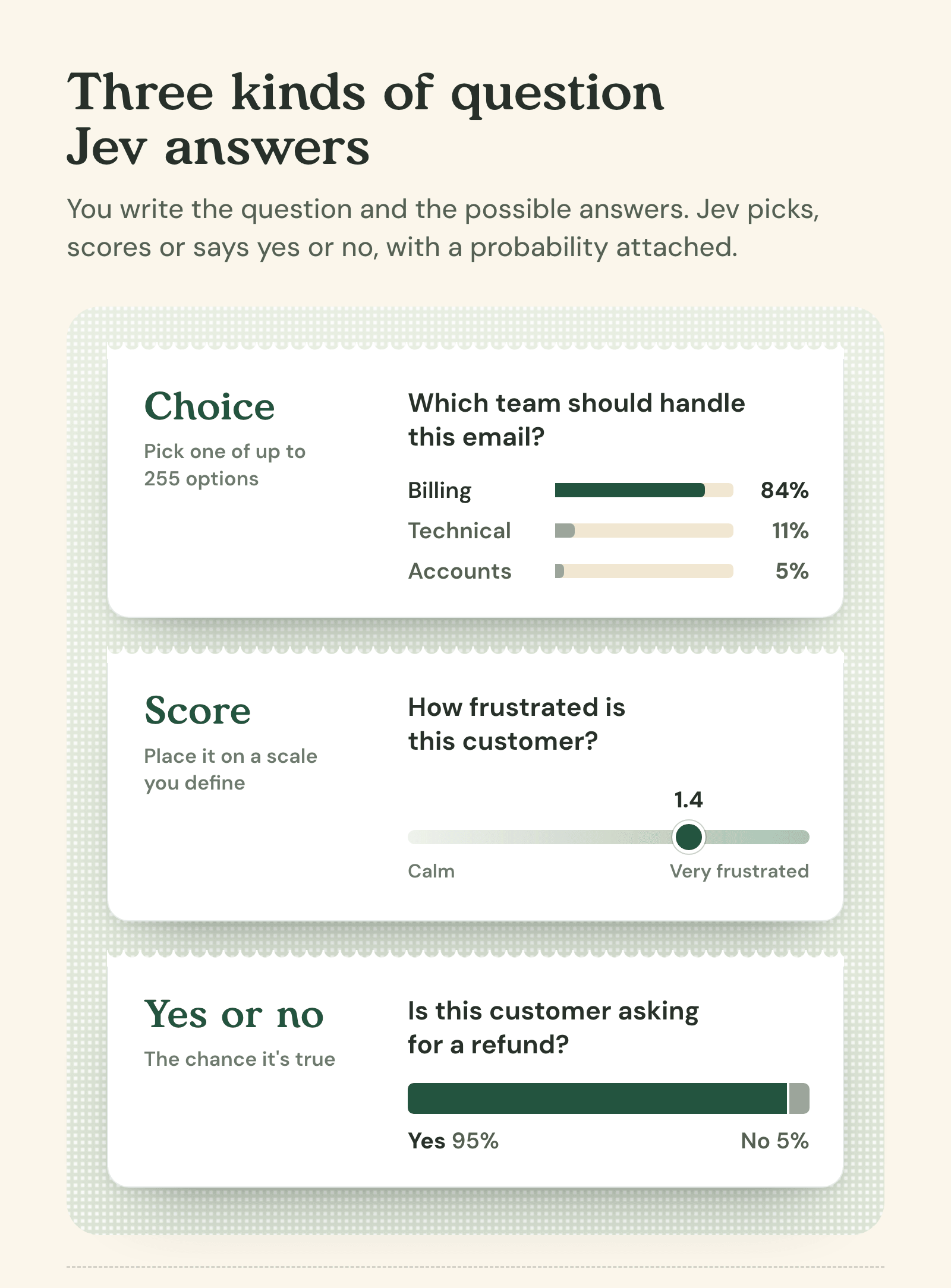
There are three kinds of question you can ask it:
- Choice: pick one option from a list of up to 255. Which team should handle this email: billing, technical or accounts?
- Score: place something on a scale you define. How frustrated is this customer, from calm to very frustrated?
- Yes or no: TypeSafe calls this one a "noul", and it gives you the probability that something's true. Is this customer asking for a refund?
It caught on quickly. Within 24 hours of arriving on Vercel's AI Gateway (a service developers use to plug AI models into their apps), nearly 13% of Vercel's paying teams were using it, according to The Next Web. That's twice the share of OpenAI's GPT-5.6 models, and Vercel says no model has ever spread across the gateway faster. It turns out developers had a lot of small decisions they were sick of paying a chatbot to make.
The name is a nod to William Stanley Jevons, a 19th-century economist. The Jevons paradox says that when something gets cheaper, people end up using more of it, not less. That's TypeSafe's bet: make a decision cost a fraction of a penny, and you'll start making them everywhere.
Is Jev an LLM?
No, at least not in the way most people mean. Jev reads language like an LLM does, but it never writes any. TypeSafe's own documentation is blunt about it: these models don't write replies, produce code or explain their reasoning. You get a decision and some numbers, and that's your lot.
TypeSafe calls Jev a "System One" model. If you've read Daniel Kahneman's Thinking, Fast and Slow, you'll recognise the idea. System One is the fast, instinctive part of your brain, the bit that knows a face is angry before you've thought about it. System Two is the slow, deliberate part that does long division and writes emails. Chatbots work like System Two: they think out loud, one word at a time. Jev is System One. It just knows which way to jump.
Here's the analogy that works for me. If a language model is your receptionist chatting to a caller, Jev is the instinct that tells them which folder to open.
Because it doesn't write, Jev has some useful habits that chatbots don't:
- It can't go off script. It can only answer with one of the options you gave it.
- It tells you how sure it is. Every option gets a probability, so you decide what happens when it's unsure.
- It's quick. About a third of a second in our tests, even when choosing between more than 200 options.
- It's cheap. $0.042 per million tokens it reads (a token is roughly three quarters of a word), and its answers cost nothing at all.
How Jev differs from ChatGPT and embeddings
To see where Jev fits, it helps to compare it with the two kinds of AI model most products are built on today. You'll know language models: ChatGPT, Claude, Gemini. You might not know embeddings, but you've almost certainly used them. They're the tech behind most "chat with your documents" tools. An embedding model turns text into a long list of numbers, so a computer can find pieces of text that are similar to each other.
| Language models | Embeddings | Jev | |
|---|---|---|---|
| What it does | Writes | Finds similar text | Picks from options you give it |
| What you get back | Words | A ranked list of the closest matches | A decision, with a probability for every option |
| Says when nothing fits | Sometimes | No, there's always a closest match | Yes, if you give it a "none" option |
| Speed | Seconds | A fraction of a second | About a third of a second |
| Cost | The most of the three | Fractions of a penny | Fractions of a penny, answers free |
| Best for | Conversation and writing | Searching a huge pile of text | Choosing, sorting, routing and checking |
Embeddings are good at "it's somewhere around here". Language models are good at talking about it once you've found it. Jev is good at "it's this one". As you'll see, the best results often come from using them together.
Why Jev matters for small businesses
Most businesses don't need an AI that can write a sonnet about boiler servicing. They need software that makes the hundred small decisions a day that currently land on a person. Which enquiries are worth a call back? Which emails are urgent? Which job is this booking for? Is this customer unhappy?
For those jobs, Jev has four things going for it:
- It can't invent an answer outside your list. Give it five options and you'll get one of those five. There's no sixth answer it made up because it sounded helpful.
- It knows when it doesn't know. Add "none of these" and it'll use it. In our test, when callers asked something a business's website didn't cover, Jev said so 95% of the time. The standard approach managed 23%.
- It's fast enough for a phone call. About a third of a second. On the phone, that's the gap between "let me check" and the answer.
- It costs next to nothing. Our whole experiment, 1,449 requests to Jev, cost about 45 cents. Not 45 dollars. Cents.
How Jev works in practice
Here's the basic process for putting Jev to work on a decision:
- Describe the situation. TypeSafe calls this the "state": the email, the call so far, the form someone filled in.
- Ask one clear question. Pick one, score it, or yes or no.
- Give it the options, plus "none of these". Describe each one the way your customers would talk about it.
- It scores every option at once. You get a probability for each, in about a third of a second.
- Your software acts on the answer. Route the email, flag the lead, open the right page. If anything needs saying, a language model does the talking.
The big difference from a chatbot is that you're not asking Jev to write anything. You're asking it to choose. That makes it much easier to test, because you can check its choices against the right answers. It also makes it easier to trust, because it can't wander off and improvise.
A step-by-step example: teaching our receptionist to say "let me check"
Let me show you how this works on the job we tested it with. Sayora answers the phone for small businesses: plumbers, estate agents, electricians, bars. Most calls are routine. Then someone asks whether the valuation is free, if you fit water softeners, or whether they can bring the dog.
The answer is usually somewhere on the business's own website. The trick is finding the right page, fast, while someone's waiting on the line.
Step 1: The caller asks something specific
Here's a question from our test, for an estate agent:
"If I get you lot round to value my house, do I have to pay for that or am I tied into selling with you?"
A good human receptionist would say "let me check" and open the right page. That's exactly what we want the AI to do.
Step 2: Read the website and describe every page
Before any calls come in, we read the estate agent's whole website. Leaving out the individual property listings (the receptionist gets those from a property feed instead), that's 74 pages. For each page, an AI model wrote a short description: the title, the address, and a one-line summary of what a caller could find out there.
Step 3: Ask Jev which page answers the question
When the caller asks, the receptionist says "let me check that for you" and asks Jev a single choice question: which of these 74 pages answers what the caller just said? "None of these" is option 75.
Here's what came back, in 0.32 seconds:
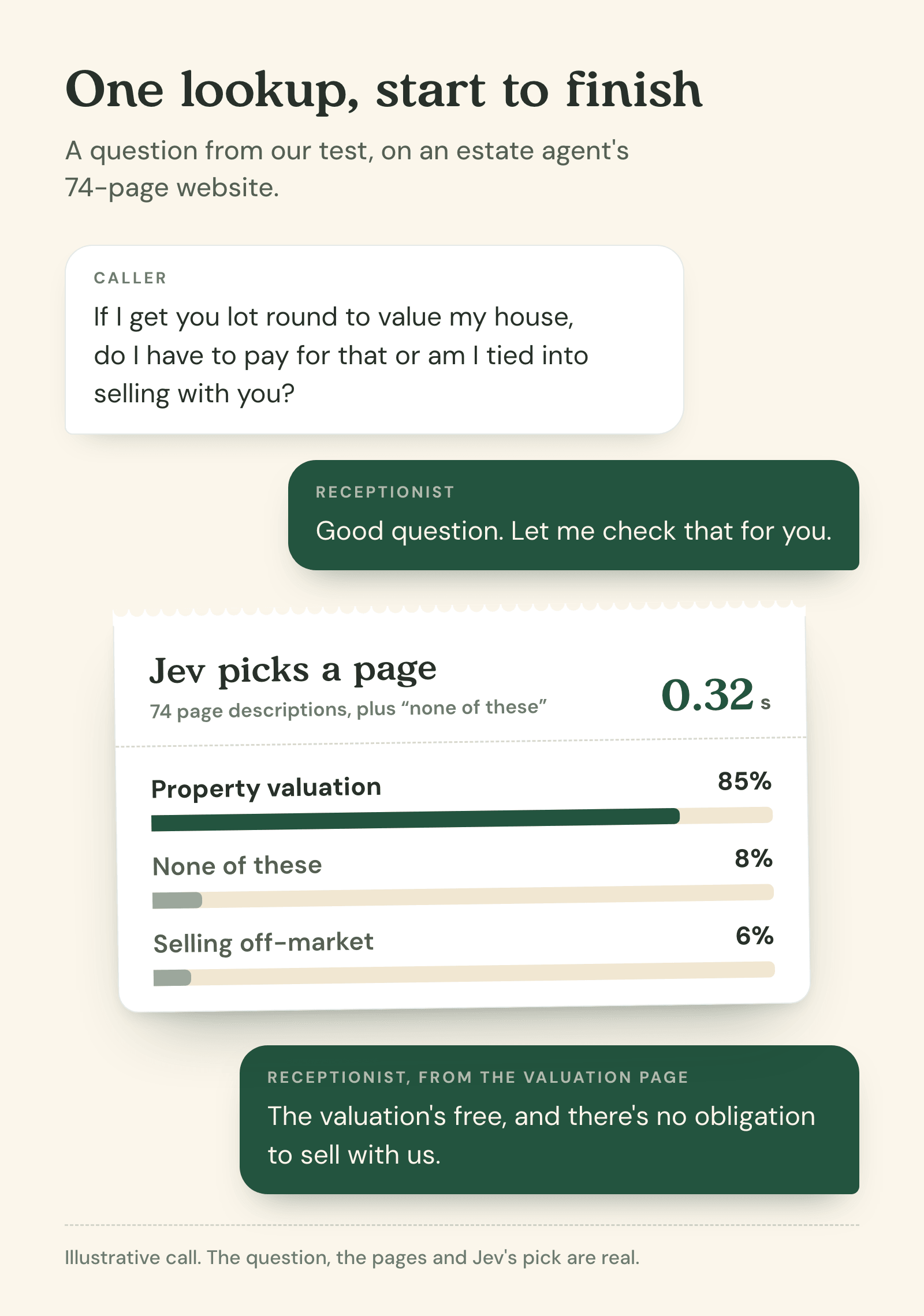
From there, the receptionist reads the valuation page and can tell the caller that the valuation is free and there's no obligation to sell. Checked, not guessed.
Step 4: Test it properly
One good answer proves nothing, so we tested it properly: four of our customers' websites, from 22 to 232 pages, and 168 caller questions. The sites answer 128 of the questions and don't answer the other 40. We compared Jev with embeddings, the standard approach for this kind of search and what our receptionist uses on bigger websites today.
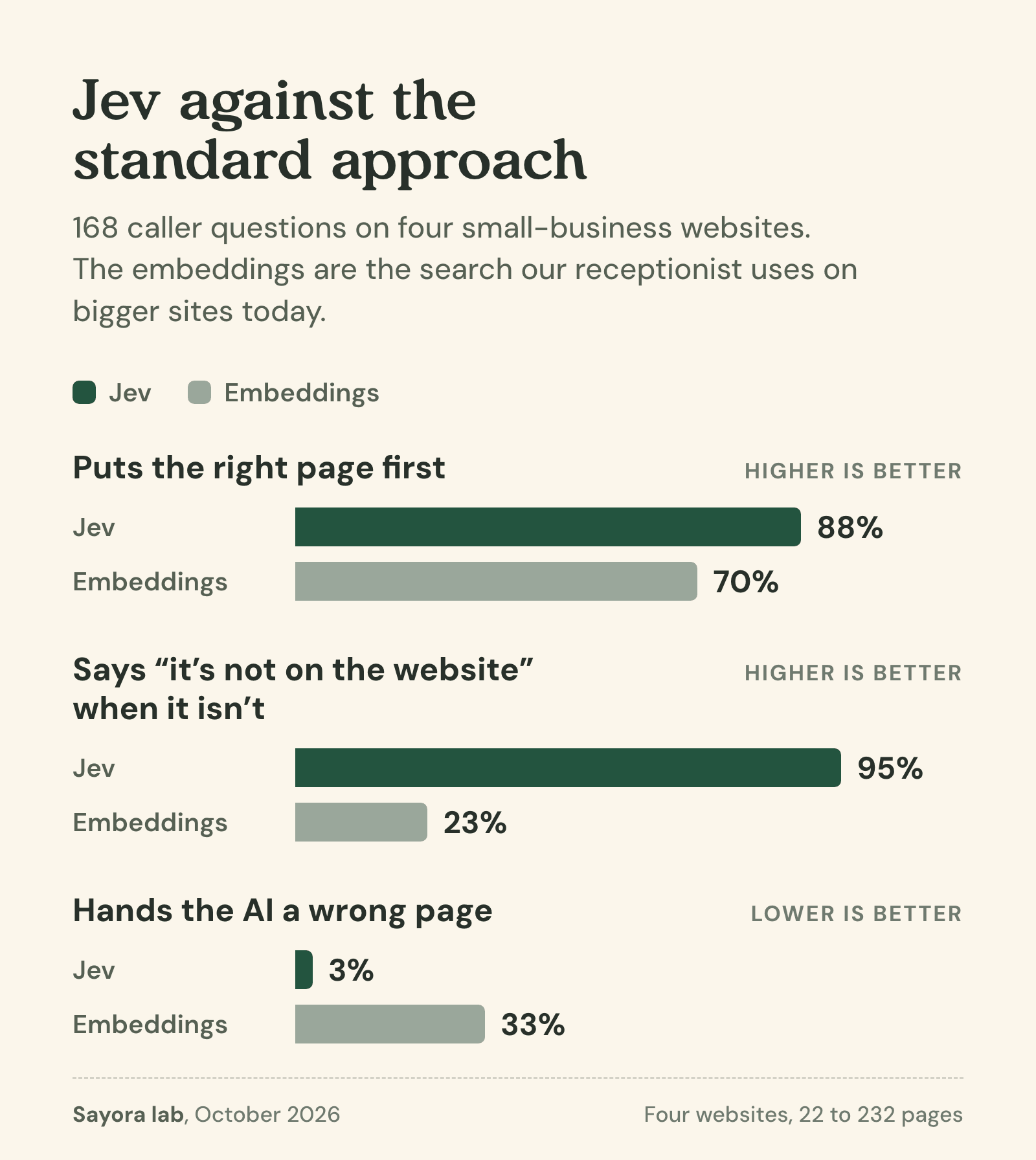
That last row is the one that matters most on a phone call. Hand a language model the wrong page and it'll often build a confident answer out of it anyway. With embeddings, that risk came up on a third of all questions. With Jev, 3%.
Step 5: Fix what it got wrong
It wasn't perfect. A caller asked a plumbing firm whether they fit water softeners. The website does mention water softeners, tucked away on the plumbing installation page, but our one-line description of that page didn't. Jev took the description at its word and said "none of these", 96% sure. Fair enough, really.
The fix was on our side. Descriptions need to name the specific things callers ask about, not just summarise the page. And for really big websites, we let embeddings make a shortlist first, then have Jev pick from it.
If you want every chart, the method and the bits that went wrong, I've written up the whole experiment here: Jev was 26% better than embeddings at context gathering.
Real-world examples
We're not the only ones finding uses for it. Here are three I think are worth knowing about, from the sensible to the gloriously silly.
Every: a writer's back catalogue, judged in under a second
Mike Taylor, head of evals at the publication Every, gave Jev all 27 of his Every articles plus 10 deliberately AI-styled versions, and asked it 21 questions about each one. Jev made 777 judgements in under 0.7 seconds, for about a quarter of a cent.
Against Claude Fable 5.1 on high effort, Jev was roughly 25 times faster per passage and about 580 times cheaper. It wasn't flawless. In a test with seven planted problems, Jev caught six and Fable caught all seven. Mike's conclusion was that he wouldn't put it into production without a more thorough accuracy check, but that a cheap early warning beats no check at all.
His advice for anyone building with AI is to start with a judgement you already make again and again. That's good advice for business owners too.
Vercel: a safety check before an AI does something risky
AI agents that can run commands on a computer need a safety check. Before the agent runs something, is it safe? Vercel's engineers had been using OpenAI's Luna 5.6 for that check. Swapping in Jev made it five to 18 times faster, according to The Next Web.
An open-source project called pi-warden uses Jev for the same job on the Pi coding agent. Across 1,168 real sessions, it stopped 419 risky actions before they ran. In a head-to-head test, the agent broke one of the project's rules in 6 of 150 runs without pi-warden, and in none of 150 with it.
For a small business, the same idea applies anywhere an AI is about to do something that matters. A quick check before it books an appointment, cancels one, or promises a customer anything.
Jev plays Doom
And now for something completely different. TypeSafe's launch included a demo of Jev playing Doom, the 1993 shooter, making ten decisions a second. The engineer who built it was worried that many decisions would get expensive. It works out at about $7 an hour.
Since launch, people have had it playing Super Mario, Subway Surfers, and Smash Bros against itself. My favourite is another TypeSafe demo, Wikipedia racing: get from one Wikipedia page to another using only the links on each page, which can mean choosing between hundreds of links at every step.
It's silly, but it makes a serious point. Wikipedia racing is basically the job our receptionist does: pick the right page from hundreds, quickly. And anything fast enough to play a video game is easily fast enough for a phone call.
Our journey at Sayora
Here's something most people don't realise about AI phone assistants. They're not one AI. They're a team.
When you ring a Sayora number, one model cleans up the background noise, another listens for when someone's speaking, another turns speech into text and spots when you've finished your sentence, a language model works out what to say, and a voice model says it out loud. Each one does one job, and each one is there because it's better at that job than a do-everything model would be.
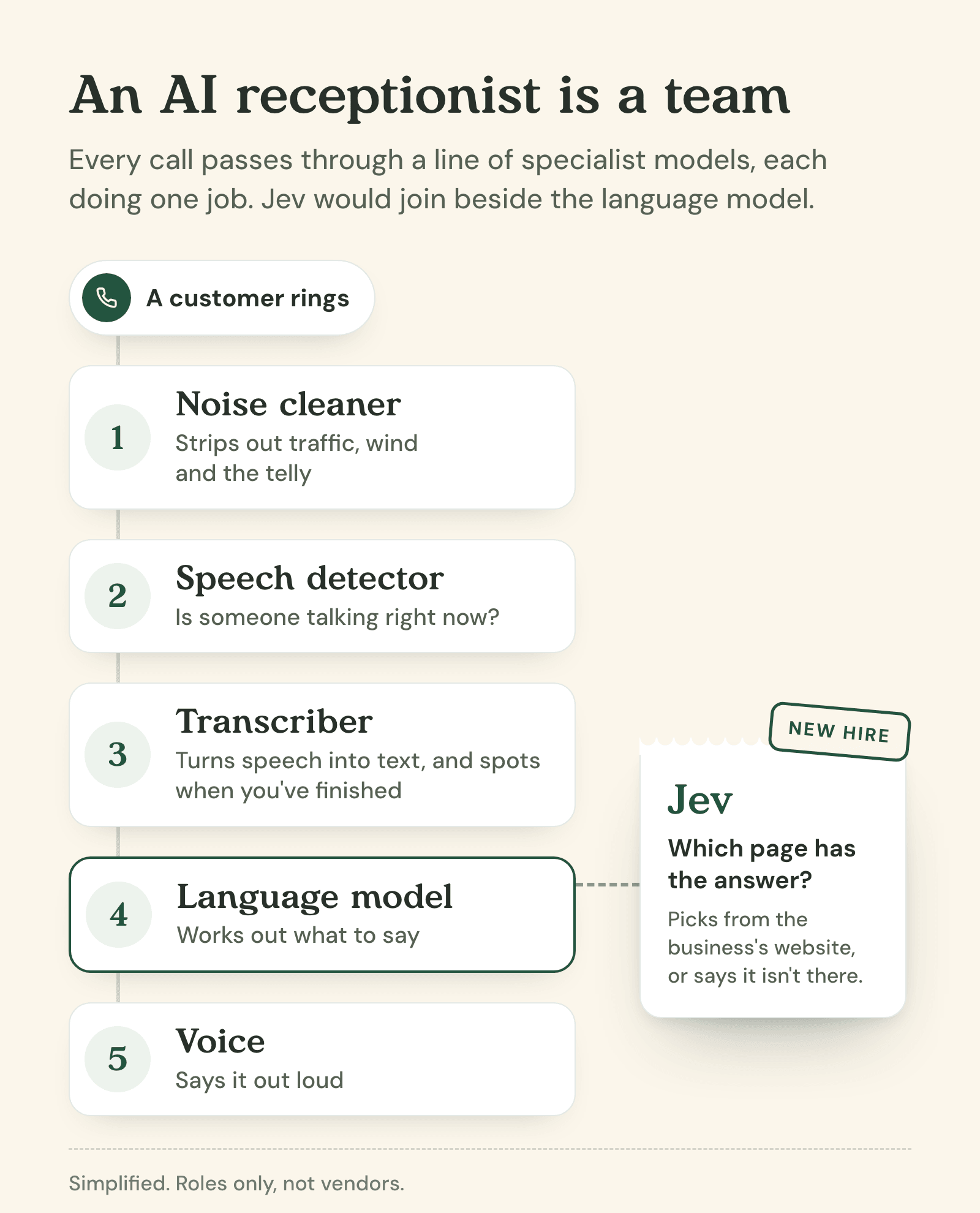
Today, our receptionist reads a few pages of a business's website up front, and on bigger sites it leans on embeddings to find the right bit. After this experiment, Jev looks like the next hire: the colleague who knows exactly which folder to open, and says so when the answer isn't in any of them.
We're exploring what that looks like for the next version of Sayora. The receptionist would keep the essentials to hand (your hours, your services, the things you've told it) and look up everything else on your website only when a caller needs it.
Models with one job: the tools
Jev isn't alone. It's part of a growing class of AI models that do one job rather than everything. Here are the ones worth knowing about.
Jev, from TypeSafe
Best for: fast decisions from a list you define.
Key strength: a probability for every option, and a willingness to say "none of these".
Watch out for: it only knows what you tell it.
Pricing: $0.042 per million tokens read. Answers are free.
The one this article's about. You can use it through TypeSafe's own API or Vercel's AI Gateway. One bonus use: TypeSafe has a guide to re-ranking search results with Jev. On 40 legal search queries, it lifted the share where the right result came first from 5% to 18%, for about six cents.
OpenAI's Decisions API
Best for: the same kind of job, from a big lab.
Key strength: reportedly built on a tuned version of GPT-6 Luna, and OpenAI claims answers in around 150 milliseconds.
Watch out for: it's in limited preview, and the limits aren't published yet.
Pricing: not published yet.
Announced at OpenAI's DevDay on 29 September 2026, it's a sign the idea's catching on. We haven't had access yet, so we tested the model it's built on instead. More on that in the experiment write-up.
Embedding models
Best for: searching a huge pile of text for anything similar.
Key strength: very fast and very cheap, even across millions of documents.
Watch out for: there's always a "closest match", even when nothing matches.
Pricing: fractions of a penny per page.
OpenAI, Google, Cohere and plenty of others offer them. They're behind most "chat with your documents" tools, and they're still the right choice when you've got thousands of documents to search.
Rerankers
Best for: re-ordering search results so the best one comes first.
Key strength: reads the question and each result together, which makes it more accurate than embeddings alone.
Watch out for: slower than embeddings, so you only re-rank a shortlist.
Pricing: usually charged per search.
Cohere's Rerank is the best-known example. In a way, a reranker is a decision model with one fixed question: how relevant is this?
Speech models
Best for: anything involving voices.
Key strength: each one is tuned for a single step: cleaning up noise, spotting speech, transcribing it, or speaking.
Watch out for: accents, background noise and phone-line quality matter more than any spec sheet suggests.
Pricing: usually by the minute or by the character.
These are what every AI receptionist, ours included, is built on, and most voice products use a different specialist for each step.
How to start using decision models in your business
If you're curious, here's how I'd approach it.
1. Spot the decisions you make again and again
Look for small judgements someone in your business makes many times a week. Which enquiries are real leads? Which emails need an answer today? What kind of job is this booking for? Is this customer unhappy?
2. Write the options down
If you can't list the possible answers, it isn't a job for Jev. "Which of our services is this enquiry about?" works. "What should we say to this customer?" doesn't. That's a job for a language model.
How you describe the options matters a lot. Jev reads them literally.
Weak options: "Plumbing", "Heating", "Other".
Strong options: "Plumbing repair: leaks, drips, blocked drains, burst pipes", "Boiler or heating: no heating, no hot water, boiler servicing", "New installation: bathrooms, kitchens, water softeners", and "None of these: not about our services".
3. Always add "none of these"
This is the single most important thing we learned. Without a way out, any model will pick the least-bad option and look confident doing it. With one, Jev will tell you when nothing fits.
4. Try it on last month's examples
You already know the right answers for last month's emails or enquiries. Run them through and see how often Jev agrees with you. That's your accuracy, measured on your business rather than on someone's marketing page.
5. Keep a person on the "not sure"s
Use the probabilities. If Jev's 95% sure, let the software act. If it's 50/50, hand it to a person.
6. Leave the maths to software
TypeSafe's own list of Jev's weak spots includes counting and dates. Work out "is this booking within 14 days?" in ordinary code, then give Jev the answer.
7. Learn from the gaps
Every "none of these" is information. When our receptionist's lookup says the website doesn't cover something, that's a question a customer asked that the website doesn't answer. Collect them and you've got a to-do list for your website.
If you're technical (or have someone who is), here's roughly what a request looks like. It's a simplified version of the one we used in our test:
POST https://api.typesafe.ai/v1/systemone

{
  "model": "jev-1.13.0",
  "state": { "caller_question": "Do I have to pay for a valuation?" },
  "questions": {
    "page": {
      "type": "choice",
      "instructions": "Which page of the website answers the caller's question? Pick none when no page does.",
      "criteria": {
        "valuation": "Property valuation: free, no-obligation home valuations",
        "fees": "Fees and charges: what we charge sellers and landlords",
        "none": "No page on the website answers the question"
      }
    }
  }
}
Back comes the choice ("valuation") and a probability for every option.
Limitations of Jev and how to overcome them
Jev isn't magic. Here's where it struggles, and what to do about it.
It reads literally
Limitation: Jev only knows what you tell it. If a page description doesn't mention water softeners, Jev won't guess they're in there.
How to overcome it: describe your options in your customers' words, and name the specific details people ask about.
It's weak at counting and dates
Limitation: TypeSafe lists counting, dates and negation among Jev's weak spots.
How to overcome it: do the sums and date checks in ordinary code first, and hand Jev the result as part of the situation.
It has size limits
Limitation: a choice question takes up to 255 options, and a single request can carry about 64,000 tokens. In our tests, that's roughly 550 described web pages.
How to overcome it: for bigger lists, let embeddings make a shortlist and have Jev choose from it, or ask in two steps (which section, then which page).
It can't write
Limitation: Jev will never tell your customer anything. It only decides.
How to overcome it: pair it with a language model. Jev decides, the language model talks.
Irrelevant detail throws it off
Limitation: the more irrelevant material you give it, the worse its decisions get.
How to overcome it: keep the situation short. For a phone call, the last couple of things the caller said beat the whole transcript.
It's brand new
Limitation: Jev is three weeks old, from a startup. It runs in the US, and at the time of writing we couldn't find a published data processing agreement, which matters if you're handling customer data under UK or EU GDPR.
How to overcome it: keep a fallback (we'd keep embeddings as a backup), and check the data protection side before you send it anything personal.
From answering the phone to knowing your customers
The thing that excites me most about Jev isn't the speed or the price. It's that "none of these" answer.
What changes for a business
An AI receptionist that checks instead of guessing is a different product. When a caller asks about your valuation fees, it opens your valuation page. When they ask about something your website doesn't cover, it says so and passes the question on, instead of improvising something plausible. For a business owner, that's the difference between a tool you can leave running and one you have to babysit.
Why "not on the website" is valuable
Every time the lookup says "none of these", you've learned something: a question your customers ask that your website doesn't answer. Do you take card payments? Is there parking? Do you do Saturday call-outs? A human receptionist would quietly work around those gaps for years. A decision model can count them for you.
That's the direction we're exploring at Sayora. Every "I'm not sure" becomes a question for the owner, and once you've answered it, the receptionist knows for next time.
How small decisions add up
Remember the Jevons paradox? When something gets cheaper, you use more of it. At a fraction of a penny a decision, you can afford to check every call, score every enquiry and sort every email, not just the ones someone has time to look at. None of those decisions is exciting on its own. Together, they add up to a business that misses less.
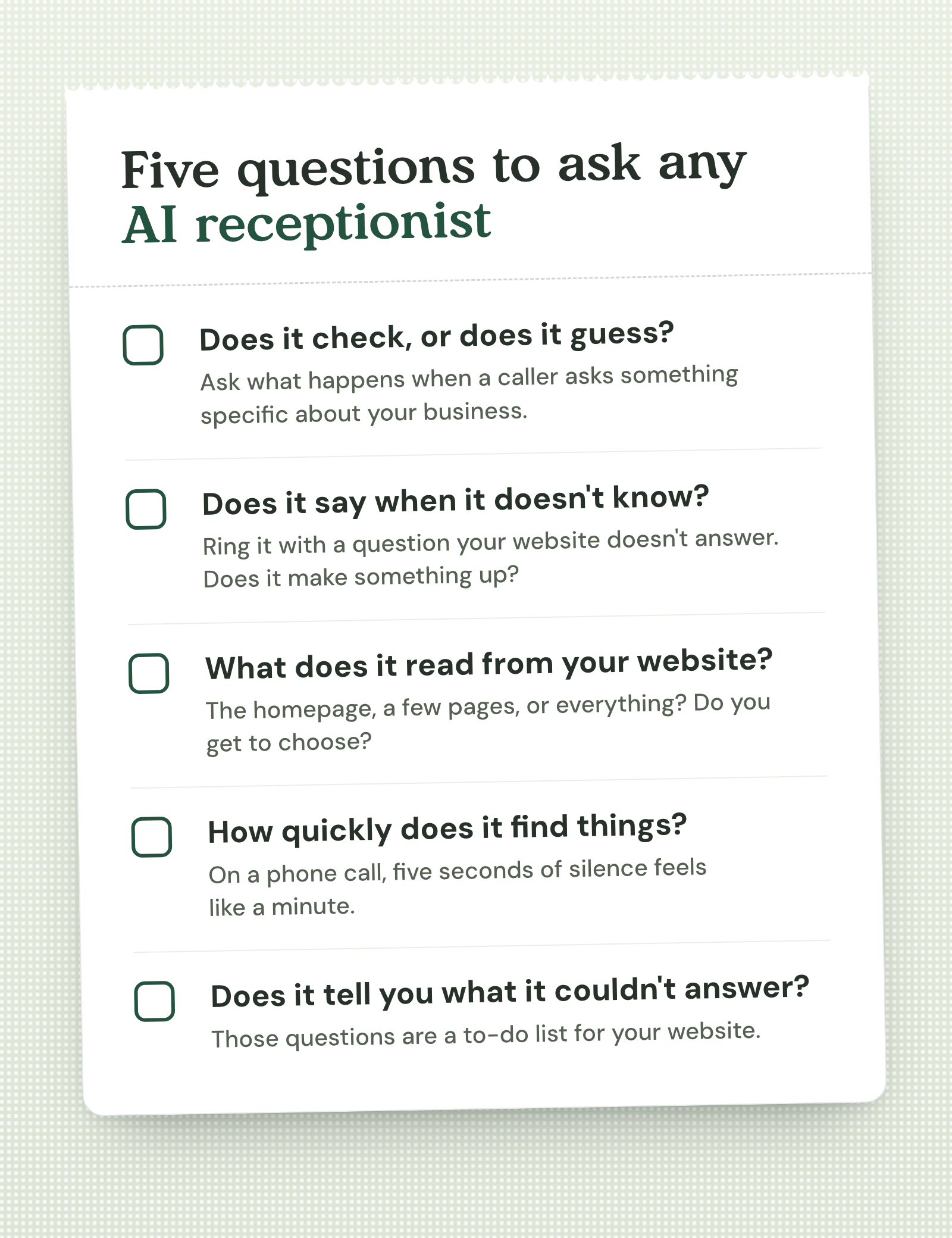
Five questions to ask any AI receptionist
Whether you're looking at Sayora or anyone else, here's what I'd ask:
- Does it check, or does it guess? Ask what happens when a caller asks something specific about your business.
- Does it say when it doesn't know? Ring it and ask something your website doesn't cover. Does it make something up?
- What does it read from your website? The homepage, a few pages, or everything? Do you get to choose?
- How quickly does it find things? On a phone call, a five-second silence feels like a minute.
- Does it tell you what it couldn't answer? The questions it couldn't handle are the most useful thing it can give you.
Frequently asked questions
Is Jev an LLM?
No. Jev reads language like a large language model, but it never writes any. It answers typed questions (pick one, score it, or yes or no) with a probability for every possible answer. TypeSafe calls it a "System One" model.
Who makes Jev?
TypeSafe, an AI startup founded by Diogo Almeida, who previously worked at OpenAI on the research behind ChatGPT. Jev launched on 15 September 2026.
How much does Jev cost?
$0.042 per million input tokens, and its answers are free. Picking a page from a 100-page website costs around a twentieth of a cent. Our whole experiment, 1,449 requests, cost about 45 cents.
Is Jev better than embeddings for RAG?
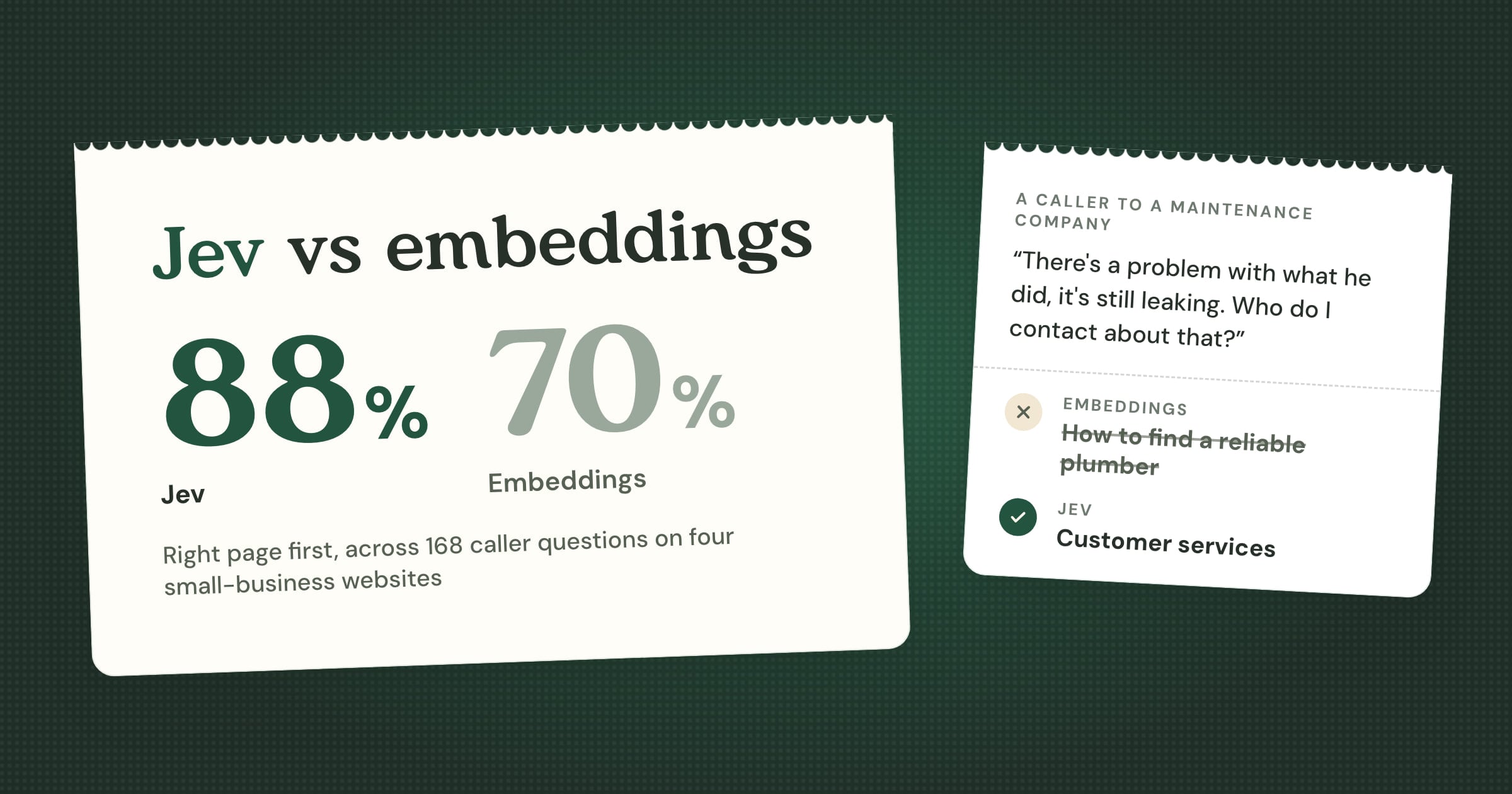
For picking the right page of a small business website, in our test, yes: it put the right page first 88% of the time against 70% for our production embeddings, and handed over a wrong page 3% of the time against 33%. For very large collections, use both: embeddings to make a shortlist, Jev to pick from it.
What's the difference between Jev and OpenAI's Decisions API?
They do the same kind of job. Jev comes from a startup and has been publicly available since September. OpenAI's Decisions API was announced in late September, is reportedly built on GPT-6 Luna, and is in limited preview, with pricing and limits not yet published.
So, what would you hand over?
Jev is a strange little model. It can't hold a conversation, can't write an email and can't tell you a joke. But give it a situation and a list, and it'll make the call in a third of a second, tell you how sure it is, and admit when none of your options fit. That's more than I can say for a lot of chatbots.
What are the small decisions in your business you'd hand to a model like this? And what do your customers keep asking that your website doesn't answer? Drop me a line on LinkedIn, I'd genuinely love to know.
If you found this useful, subscribe to Many Hands for more experiments like this one. And if you'd like to hear an AI receptionist that checks instead of guessing, you can try Sayora at sayora.ai.